Why the Phlow App Is Better Than Your iPhone Camera

Why should you take your photos in the Phlow App instead of the iPhone camera?
As a photographer, I’m always on the hunt for tools that inspire creativity and make capturing beautiful images enjoyable. My Fuji camera is one of my go-to tools for those bursts of creative energy, and when I’m shooting on my phone, I want that same spark—and that’s exactly what the Phlow app delivers.
If you’re frustrated with flat, lifeless photos from the iPhone’s default camera, trust me, you’re not alone. Phlow changes the game. It’s not just another camera app; it’s a creative toolkit that elevates your mobile photography.
Below I’ll share why I reach for Phlow over the iPhone camera, how it elevates my mobile photography, and when it’s worth switching between the two.
The iPhone camera is undeniably powerful. But if you want photos that feel artistic and reflect your creative vision, the Phlow app is a must-have. It combines the ease of shooting with your phone and the creative control of a pro camera.

The Magic of Phlow: Presets Before You Shoot
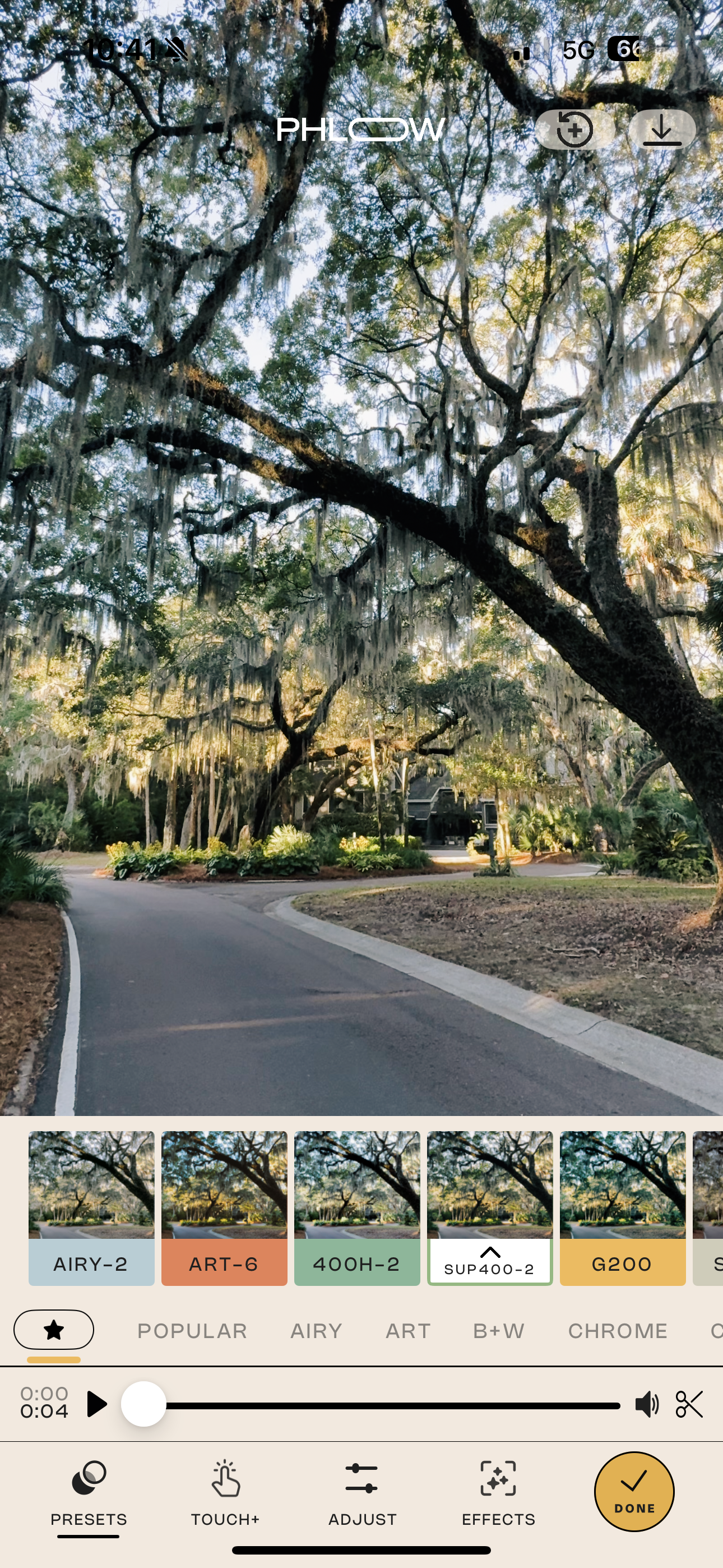
The standout feature? Phlow lets you apply presets before you take a photo or video. That’s right—your edits happen in real-time, letting you see your creative vision come to life while you shoot.
Why This Matters:
- Save Time: Instead of applying edits later, you get your final look straight out of the camera.
- Boost Creativity: Seeing your favorite preset while shooting sparks new ideas and helps you align your shots with your creative goals.
- Maintain Consistency: Keeping your mobile photos consistent is so easy when your presets are applied before the shot.
3 Reasons I Love the Phlow App
- Instant Access to My Favorite Presets
Phlow gives me instant access to my favorite presets every time I open the app. No digging through menus—it’s seamless. This is hands-down one of my top three favorite features because it keeps my workflow smooth and consistent. - Creative Edge Over Flat Photos
Let’s be honest: the default iPhone camera can sometimes leave your photos looking flat and uninspired. Phlow’s presets and live editing tools bring your photos to life, adding depth, texture, and personality that make them stand out. - Quick Access with a Widget
I love that I can put a Phlow widget on the front of my phone. It’s like having a shortcut to creativity right at my fingertips. No scrolling through apps—just tap, and I’m ready to shoot with all my favorite tools.
Why the Phlow App Camera Is Better
- Apply Presets Before Shooting
One of the standout features of the Phlow app is the ability to apply your favorite presets in real-time before taking a photo or video. This lets you visualize your final image as you shoot, saving time on post-processing and ensuring every shot matches your creative vision. - Access to Your Favorite Presets Instantly
Every time you open the app, your favorite presets are right there—no digging required. This makes it easy to keep your mobile photos consistent and prevents the flat, uninspired look that iPhone photos can sometimes have. - Better Creative Control
While the iPhone camera excels at quick snapshots, it lacks the artistic tools needed to create a cohesive, stylized look. Phlow elevates your photos by incorporating authentic film simulations, manual controls, and advanced editing options. - Consistent Quality Across Photos and Videos
By applying presets as you shoot, you ensure your photos and videos maintain the same tone and mood, creating a polished, professional look. - Quick Access with Widgets
You can add a Phlow widget to your home screen for instant access. This means you can skip scrolling through apps and start shooting with your favorite presets in seconds.

When to Use Phlow vs. iPhone Camera
Knowing when to use the right tool can make all the difference in your results. Here’s how I decide:
Use the Phlow App When:
- You Want Consistency: Perfect for creating a cohesive aesthetic for social media or projects.
- You’re in a Creative Mood: Phlow’s presets and real-time adjustments make it easy to experiment.
- You’re Shooting in Challenging Light: The app’s controls and presets help balance tones better than the iPhone’s default settings.
- You’re Shooting Video: Real-time color grading in Phlow makes your videos look polished from the start.
Use the iPhone Camera When:
- Speed is Crucial: For quick snapshots or moments when you don’t have time to open an app and there’s no need for an edited photo.
- You Need Native Features: Such as Live Photos or portrait mode bokeh effects.
That said, with the Phlow widget, opening the app is super quick!
Consistent Photos, Creative Edge
Phlow has completely changed the way we can approach mobile photography.
It makes creating a consistent aesthetic effortless while keeping the creative process fun and inspiring.
Whether I’m shooting for Instagram or just documenting my day, Phlow bridges the gap between my phone and my professional gear. It’s like carrying a mini creative studio in my pocket.
If you’re tired of uninspired photos, give Phlow a try. I think you’ll find, like I did, that it’s not just a tool—it’s a favorite you’ll reach for again and again.